What it is
The KuikCode MCP server connects your KuikCode workspace to the AI assistant you already talk to. Once connected, the assistant can create codes, change where printed codes point, set routing rules, read scan numbers and hand you print files, all through the same account and the same limits as the dashboard. Nothing is saved until you have seen it and said yes.
- 1. Ask
In plain words, in the assistant you already use.
“Make a QR code for our spring menu in the site's colors.”
- 2. Choose
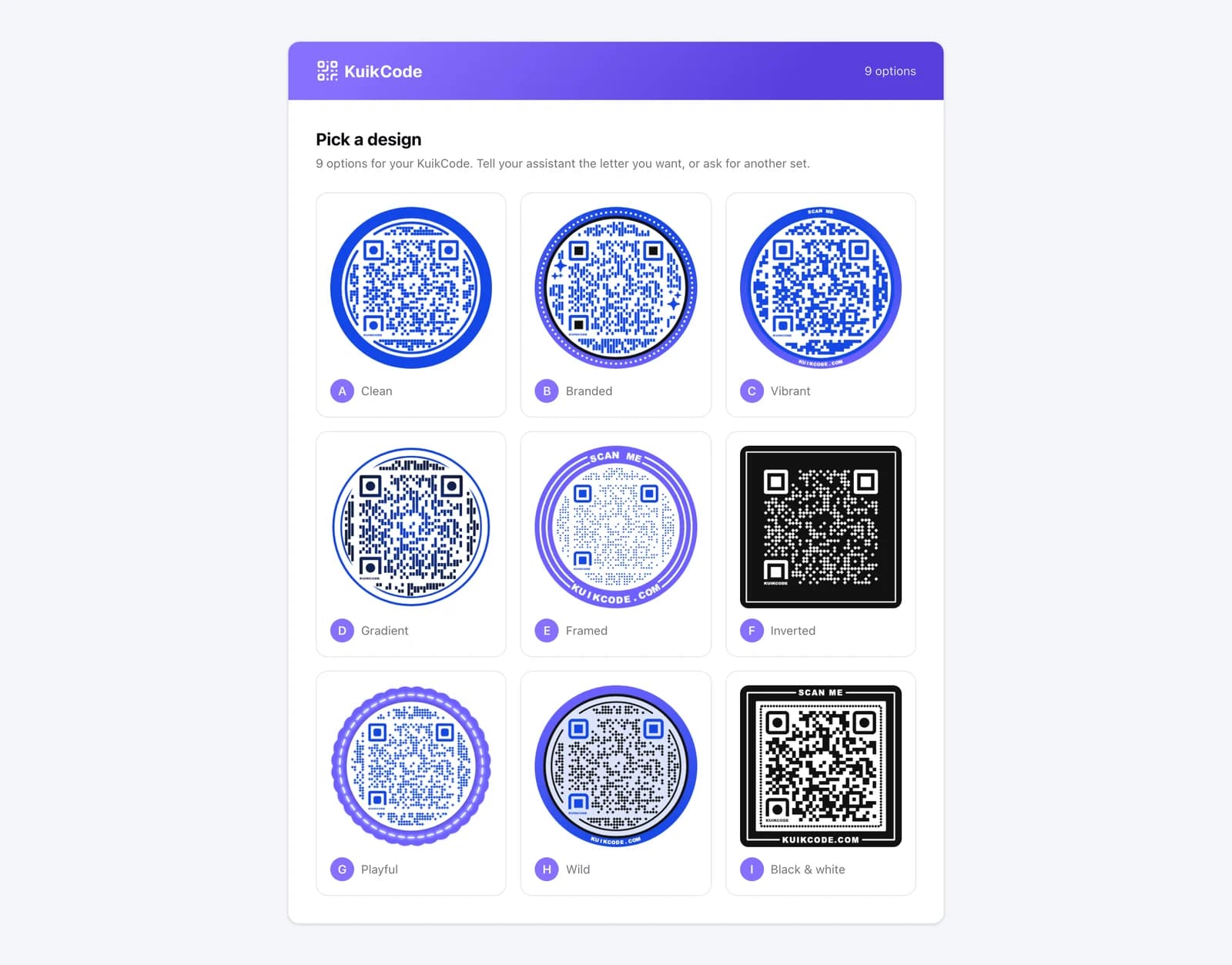
Nine designed options on one page, lettered A to I. Nothing is saved yet.
“B, but squared, with SCAN on top.”
- 3. Approve
Name, folder, tags and a template if you want one. Then it saves.
“Yes. Call it Spring menu, tag it print.”
- 4. Print
PNG, SVG or JPG at print size, one link.
“SVG please.”
Designed, not default
A code made by an assistant is usually a plain black square. Here the assistant runs the same Auto Design that powers the editor: it reads the destination site's brand colors and produces nine designed, scannable options on one page. Say the letter you want. Say “squared”, “navy”, “SCAN on top” or “rounder eyes” and the same design comes back adjusted. Start from one of your saved templates or your Brand Kit when you want the house look.
Things to say
Plain requests map to the tools the server offers. A few, with what happens next:
| You say | What happens |
|---|---|
| “Make a QR code for https://example.com/menu in the site's colors” | A name is proposed, the site's brand colors are read, and you get a link with nine designed options. |
| “Show me another set” | Nine new options for the same colors. |
| “B, but use #456566 and #f59e0b” | Option B in your colors, same layout, before saving. |
| “A, but squared, with SCAN on top” | Same design, squared outline, a word on the frame. |
| “Use the Fall campaign template” | Your saved template, previewed first, saved on your yes. |
| “Point the lobby code at the winter page” | The printed code is repointed. The artwork never changes. |
| “iPhones to the App Store, Android to Play, everyone else to the site” | Smart rules, read back as sentences before they are saved. |
| “How many scans did the trade-show codes get last week?” | Totals, top codes, countries and devices for that folder. |
| “Here is a CSV, one code per row, in our brand colors” | A preview of rows, problems and quota first. The batch is created after you confirm. |
| “Don't save it” | Nothing exists before you pick. After a save it removes a fresh, never-scanned code. |
Connecting takes a minute
In Claude, add a custom connector with the address below. In ChatGPT, do the same under Developer mode. The assistant sends you to KuikCode, you pick the workspace it may use, review what it can read and change, and click Allow. Every connection is listed under Settings, Integrations, and Disconnect ends it on the assistant's next request.
https://mcp.kuikcode.com/mcp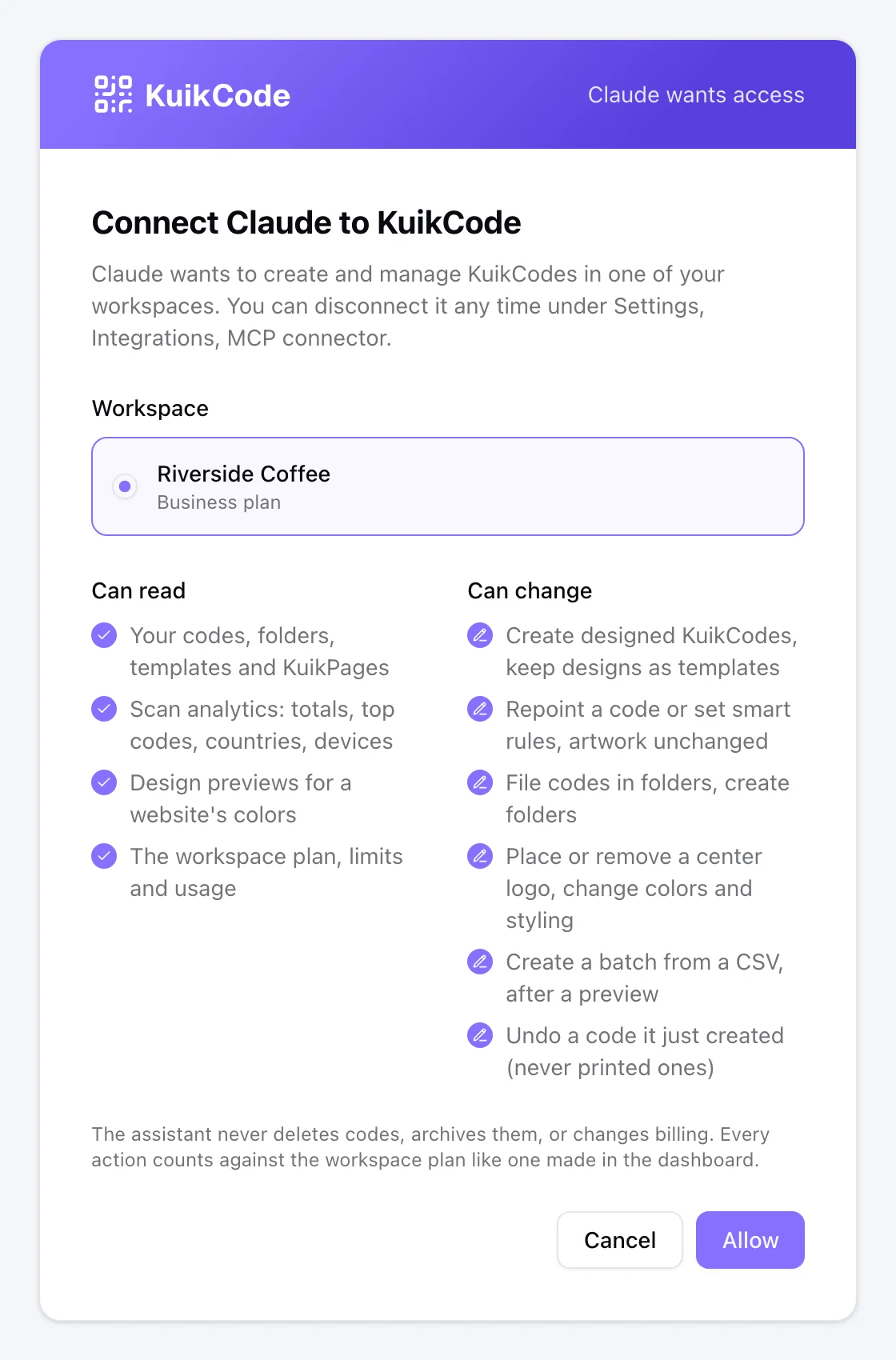
Developer tools such as Claude Code and Cursor skip the sign-in and use an API key from Settings, Developers as the bearer token. Same tools, same limits.
claude mcp add --transport http kuikcode https://mcp.kuikcode.com/mcp \
  --header "Authorization: Bearer kc_live_..."
Built on the API, bounded by your plan
Every tool is a call to KuikCode's public REST API with a key scoped to one workspace. Ownership, plan ceilings, rate limits and audit apply exactly as they do in the dashboard. When a request would pass a limit, the assistant gets the numbers and the link to Plan & Billing rather than a failure, so it can tell you what to do.
The assistant never deletes or archives a code that may be in print, never changes billing or members, and never unpublishes a KuikPage. It can undo a code it created in the last day that nobody has scanned.
Who this is for
Marketing teams that make codes weekly and would rather ask than click through an editor. Agencies running several client workspaces from the assistants their staff already use. Operations people who want “point the lobby code at the new page” to be a sentence, not a ticket. Developers who want the same designs from a script, through the API the server sits on.
Questions, answered
01What is an MCP server?+
MCP, the Model Context Protocol, is the open standard AI assistants use to call outside tools. Connecting the KuikCode MCP server gives your assistant a set of KuikCode actions it can use in a conversation, the way it uses a calendar or a document tool. Claude, ChatGPT and Claude Code all support it.
02Which plan includes it?+
The Business plan. It is the plan built for teams that create codes at volume and want them where the work already happens.
03Can the assistant save something I did not approve?+
No. Every design is shown first, on a page you open from the chat, and the code is created only when you say yes. Before saving, the assistant asks once about a folder, tags, campaign parameters and whether to keep the design as a template. Changes to a saved code preview the same way.
04Will the codes look as good as the ones I design by hand?+
They come from the same engine. The assistant runs Auto Design on the site's colors, or starts from one of your saved templates or your Brand Kit, and every option passes the same scannability checks the editor enforces. You can adjust colors, shape, frame, words, dots, eyes and borders in the conversation and see the result before it saves.
05What can it not do?+
It never deletes or archives a code that may be in print, never touches billing or members, and never unpublishes a KuikPage. It can undo a code it created in the last day that nobody has scanned.
06Is my data safe?+
The server stores nothing of its own. Each connection is backed by a hidden API key scoped to the one workspace you allowed, and disconnecting it in Settings ends the assistant's access. Destination URLs, keys and tokens never appear in the server's logs.
07Does it work with ChatGPT?+
Yes. Add the same endpoint as a custom connector in ChatGPT's Developer mode. Claude Code and Cursor connect with an API key instead of the sign-in step.