People who find you on TikTok often want to see the rest: your photos, your stories, your shop. TikTok lets you put your Instagram right on your profile, so one tap takes them there. Here is how to add it, what to do when the option doesn't show, and how to give both apps one page that shows everything you post.
Add your Instagram to your TikTok profile
- Open the TikTok app and go to your profile.
- Tap Edit profile.
- Next to Links, tap Add.
- Choose Instagram.
- Log in to your Instagram account and allow the connection.
An Instagram icon now shows on your TikTok profile, and a tap opens your Instagram. The same menu also connects YouTube and Lemon8. To remove it later, go back to Edit profile and remove the Instagram link there.
No Instagram option?
TikTok says the option isn't available everywhere, so some accounts won't see it. Try these, in order:
- Update the app. An older version may not show it.
- Use the Website field. Paste your Instagram address,
instagram.com/yourname, into Website under Edit profile. TikTok shows that field to business accounts and to accounts with 1,000 followers or more. - Write your @username in the bio. It won't be tappable, but people can search for it.
If you use the Website field for Instagram, it's the only tappable link on your profile, so nothing else can go there. That's where a link in bio page helps.
One page that shows both
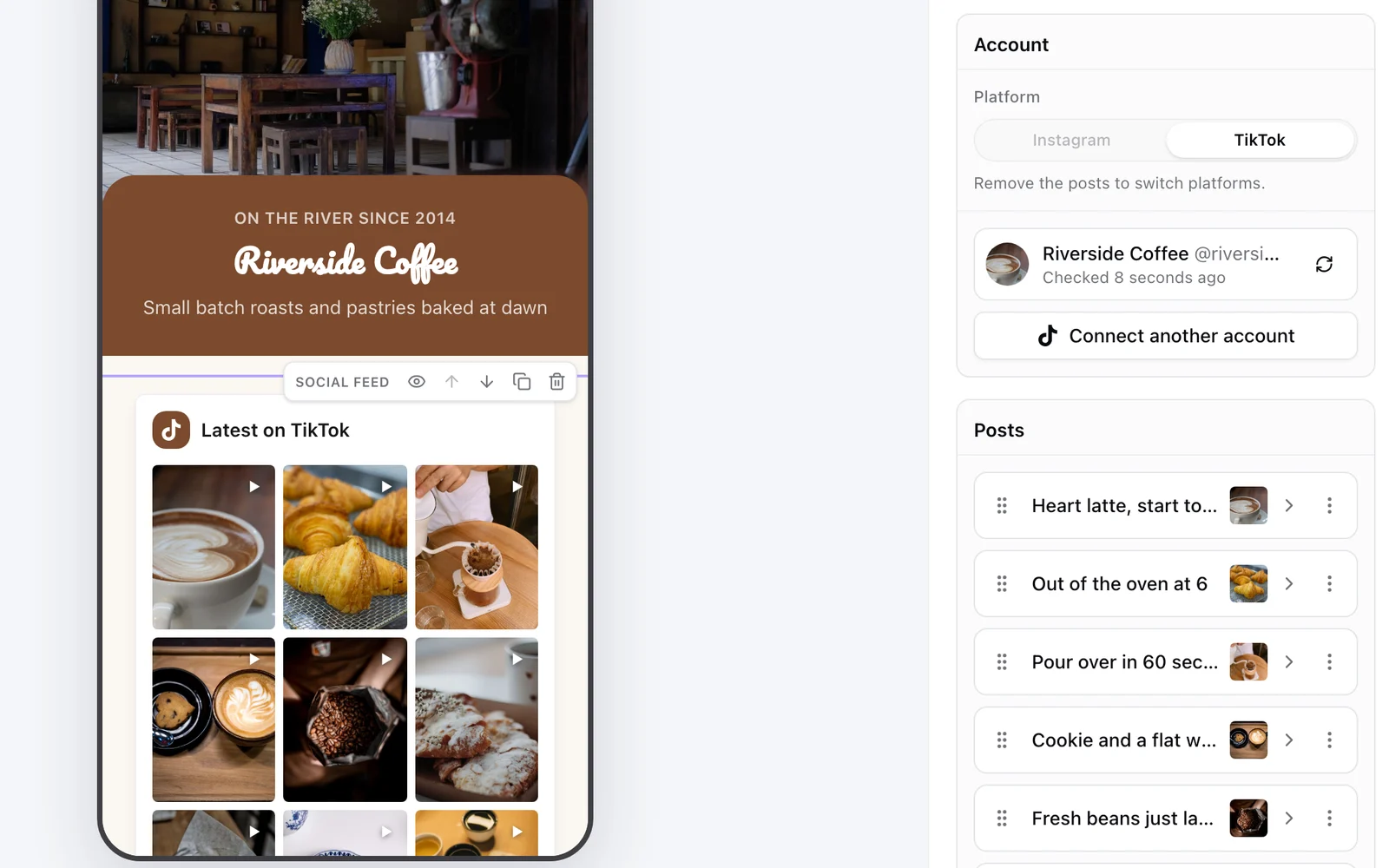
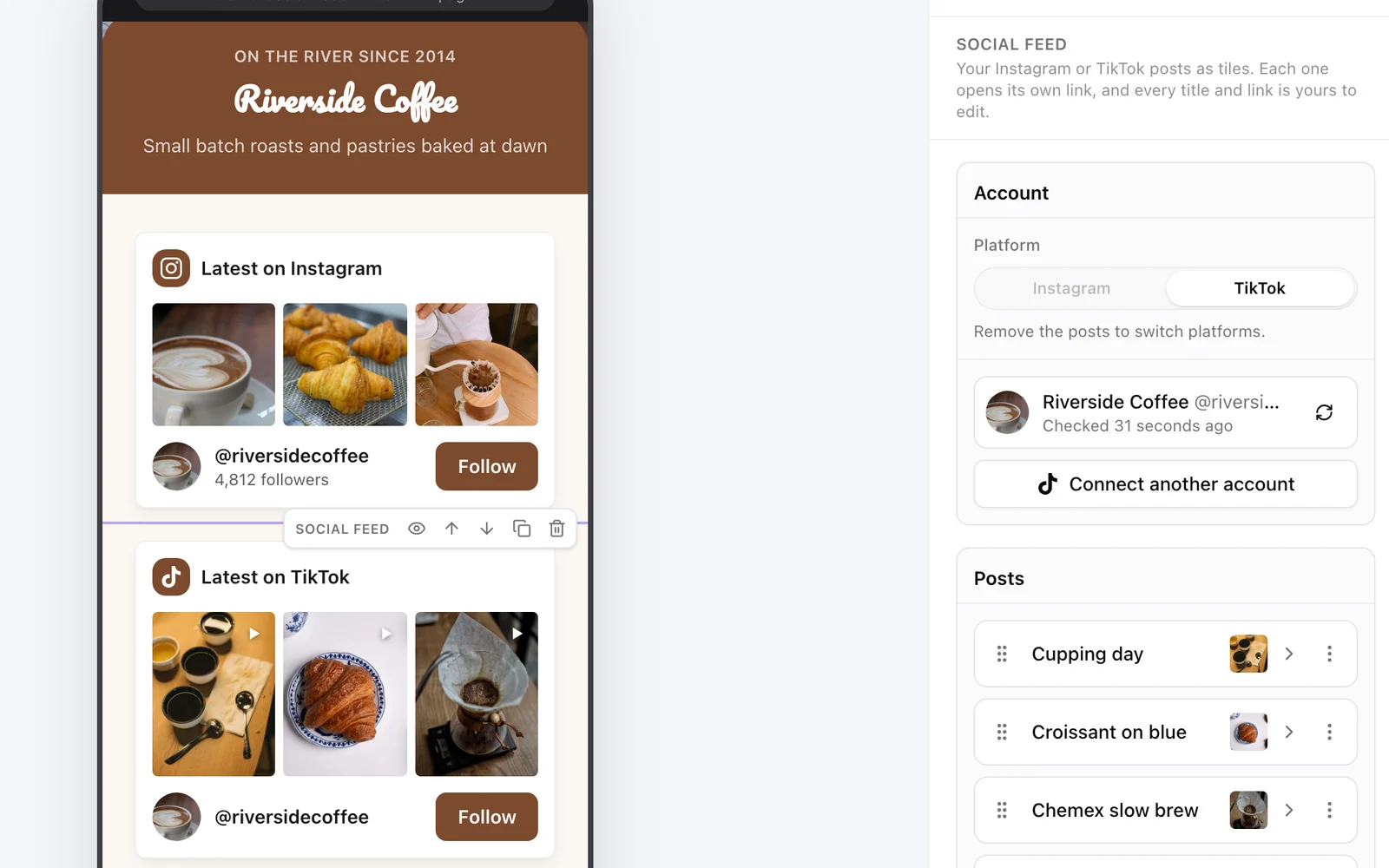
The Instagram icon on TikTok sends people to one app. A link in bio page in your TikTok Website field can send them to everything, and show your posts from both apps on it:
- In KuikCode, open KuikPages and start from the Link in Bio template.
- Add a Social feed block and connect Instagram. Pick the posts to show.
- Add a second Social feed block and connect TikTok. Pick the videos.
- Turn on Add new posts automatically in each, so every new post shows up within the hour.
- Add Buttons for your shop, booking or newsletter, then Publish.
- Paste your
yourname.kuik.pageaddress into the Website field on TikTok and under Links on Instagram.
Each post becomes a tile with its own title and link, so a post about a product can open your shop, and Reels and TikTok videos play right on the page. Instagram connects with a Business or Creator account, which is free to switch to in the app, and TikTok lists your public videos. The Social feed starts on Core. More on the steps for each app in how to add a link in bio on TikTok and Instagram, and if you already use Linktree, see Linktree for your TikTok bio.
And the other way: TikTok on your Instagram
To send Instagram followers to your TikTok:
- In Instagram, open your profile and tap Edit profile.
- Tap Links, then Add external link.
- Paste your TikTok profile address,
tiktok.com/@yourname, give it a title and save.
Instagram lets a profile hold a few links, currently up to five, so your TikTok can sit next to your link in bio page.
Take both off the screen
Merch, packaging, flyers and the screen at an event can lead to the same page through a QR code. KuikCode gives every page its own designed code and counts every scan. To point a code straight at one profile instead, see our Instagram QR code and TikTok QR code guides.
Instagram and TikTok are trademarks of their owners. We checked TikTok's steps in its help center in November 2026; apps change often, so confirm the details in each app.
Frequently asked questions
01How do I add my Instagram to my TikTok profile?+
Open your TikTok profile, tap Edit profile, tap Add next to Links, choose Instagram and log in to your Instagram account to connect it. An Instagram icon then shows on your profile.
02Why can't I add Instagram to my TikTok?+
TikTok says the option isn't available everywhere. Update the app first. If it still isn't there, add your Instagram address in the Website field, which TikTok shows to business accounts and to accounts with 1,000 followers or more.
03Can I just type my Instagram in my TikTok bio?+
Yes, you can write your @username in the bio text. It won't be tappable, but people can search for it.
04How do I add my TikTok to my Instagram bio?+
In Instagram, tap Edit profile, then Links, then Add external link, paste your TikTok profile address and save.
05Can one page show my Instagram and TikTok posts?+
Yes. A KuikPage can hold a Social feed block for Instagram and another for TikTok. Each post becomes a tile that links where you want, and new posts can be added on their own within the hour.