The largest QR code holds up to 7,089 digits, 4,296 letters and digits, or 2,953 bytes of anything else. That's version 40, a grid of 177 by 177 squares, at the lowest error correction level. In practice, a code meant to be scanned from paper should hold far less: under 150 characters scans comfortably at small sizes, and the codes that scan best hold a short link.
Below: the full capacity table, why the type of data matters, what error correction costs, and how much to store in a real code.
QR code capacity at a glance
QR codes come in 40 sizes, called versions. Version 1 is 21 by 21 squares (modules); each version adds 4 per side, up to version 40 at 177 by 177. How much fits depends on the version, the kind of data and the error correction level.
The maximum capacity of the largest code, version 40:
| Data type | Level L | Level M | Level Q | Level H |
|---|---|---|---|---|
| Numeric (0 to 9) | 7,089 | 5,596 | 3,993 | 3,057 |
| Alphanumeric | 4,296 | 3,391 | 2,420 | 1,852 |
| Bytes (any text, URLs) | 2,953 | 2,331 | 1,663 | 1,273 |
| Kanji | 1,817 | 1,435 | 1,024 | 784 |
And the smallest, version 1: 41 digits, 25 alphanumeric characters or 17 bytes at level L, down to 17 digits, 10 characters or 7 bytes at level H. These figures come from the QR code standard, ISO/IEC 18004.
Why the type of data changes the capacity
A QR code packs data in one of four modes, and each one uses a different number of bits per character:
- Numeric stores only digits, about 3.3 bits each. Phone numbers and serial numbers pack tightly.
- Alphanumeric stores 45 characters: digits, uppercase letters, the space and
$ % * + - . / :. About 5.5 bits each. - Byte stores anything else, 8 bits per byte. As soon as there is one lowercase letter, which every normal URL and message has, the text is stored as bytes.
- Kanji stores Japanese characters at 13 bits each.
Bytes are bytes, not letters. In UTF-8, plain English letters take 1 byte each, but accented letters like é or ñ take 2 and most emoji take 4. A 750 character message in Spanish usually needs a few more bytes than the same length in English, and a message full of emoji needs many more.
Error correction: the space you trade for toughness
Every QR code carries extra data that lets a phone read it even when part of it is dirty, scratched or covered. There are four levels:
| Level | Recovers about | Good for |
|---|---|---|
| L | 7% of the code | Clean screens and documents |
| M | 15% | Most printed codes |
| Q | 25% | Codes in rough places, like outdoor signs |
| H | 30% | Codes with a logo or a design over part of them |
Higher levels use more of the grid for recovery data, so less is left for yours. That's why a code with a logo in the middle holds less: the logo covers modules, and only level H gets them back. KuikCode codes are always made at level H, so they keep scanning with logos, stickers and frames. The free QR code generator uses level M, and switches to H when you add a logo.
How much should you put in a QR code?
The standard's maximum is not a target. A code with 2,953 bytes has to be printed huge to scan, because each of its 31,000 squares has to be big enough for a phone camera to see.
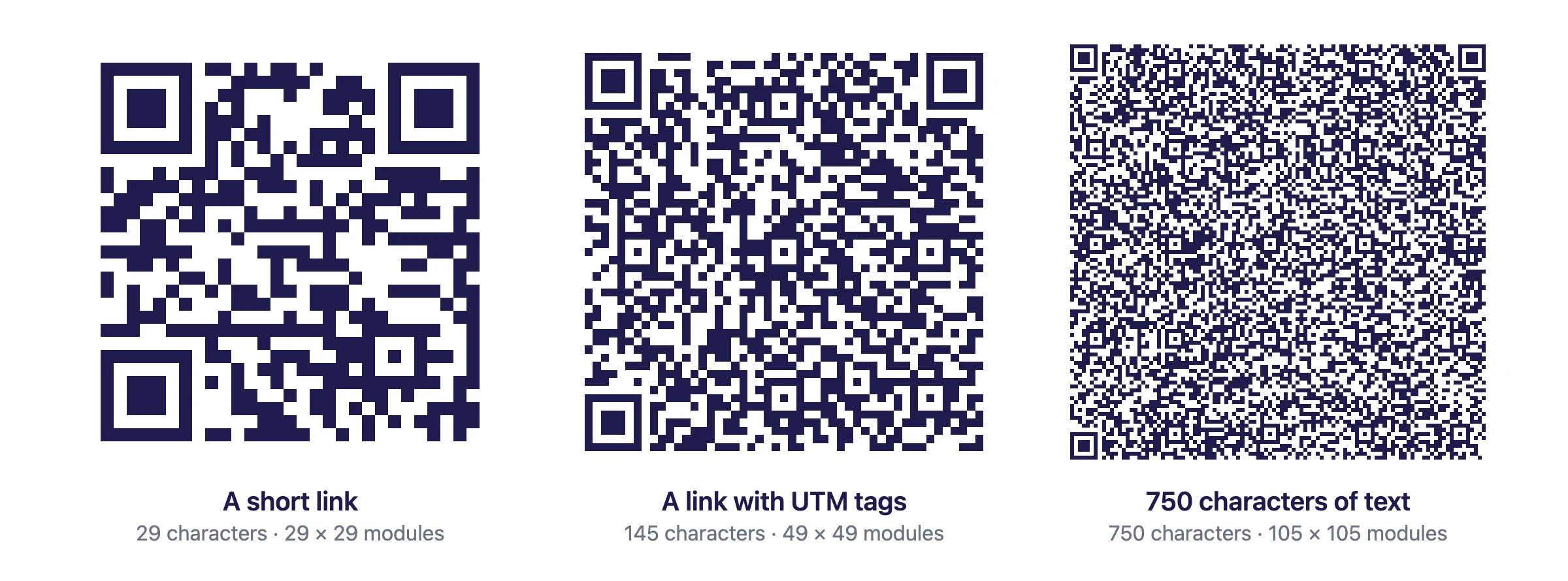
- A short link: about 30 characters, a 29 by 29 grid. Scans from small print and from far away.
- A typical web address: 50 to 100 characters. Still easy to scan when printed at normal sizes.
- A long link with tracking tags: around 150 characters, 49 by 49. Fine on a flyer, tight on a business card.
- 750 characters of text: 105 by 105. Needs at least 4 cm (1.6 in) and sharp printing.
- Over 1,000 characters: risky on paper. Many phones struggle, especially in low light.
A good rule: under 150 characters for small print, under 300 for flyers and posters. For the exact print sizes, see QR code size for print.
Store a short link, not the content
When you have more to say than fits comfortably, don't squeeze it into the pattern. Put it on a page and make the code open that page.
That's how a dynamic QR code works. It stores a short link, about 30 characters, no matter what it opens: a menu, a PDF, a gallery, a page with ten buttons. The pattern stays coarse and easy to scan, and because the content lives on a page, you can change it after printing without touching the code. It also counts every scan. The tradeoff is explained in static vs dynamic QR codes.
A static code is still the right choice for small, fixed data that should work without internet, like a WiFi password, a contact card or a short message. Our post on a QR code with a message covers text codes in detail.
Can a QR code hold a file?
No. A few kilobytes is the ceiling, so a QR code can't store a photo, a PDF, a song or a video. Codes "for a PDF" or "for a video" store a link, and the file lives on a server. That's also why a PDF QR code can swap the file later: the code never held it in the first place.
Frequently asked questions
01How much data can a QR code hold?+
The largest QR code, version 40, holds up to 7,089 numeric digits, 4,296 alphanumeric characters (digits, uppercase letters, space and $ % * + - . / :) or 2,953 bytes of any other data, at error correction level L.
02How many characters can a QR code hold?+
Up to 2,953 characters of ordinary text, such as a URL or a message with lowercase letters, because it is stored as bytes. Only digits (7,089) or uppercase letters with digits (4,296) fit more.
03How many characters can a URL in a QR code have?+
Technically up to about 2,953. In practice, keep it under 100 or so. Every extra character makes the code denser and harder to scan, which is why dynamic QR codes store a short link instead of the full address.
04Does a logo reduce how much data a QR code holds?+
Yes, indirectly. A logo covers part of the code, so it needs a high error correction level to stay readable, and level H leaves less room for data: 1,273 bytes at most instead of 2,953.
05Can a QR code store a file, a video or a photo?+
No. A few kilobytes is the limit, far too small for a photo, a PDF or a video. A QR code for a file stores a link, and the file lives on a server that the link opens.
06How much text can I put in a free QR code?+
The free KuikCode QR code generator takes up to 750 characters of text. That already makes a dense code, so print it at least 4 cm (1.6 in) wide and test it with a couple of phones.